
By using this site, you agree to the Privacy Policy and Terms of Use.
Accept
Start Your Business Magazine
Sunday, Jun 21, 2026
  • Connect:
  • Podcasts
  • Get the Book!
  • Contacts
  • Starting Up

    Starting Up

    a guide to starting a business

    • Business Planning
    • Business Ideas
    • Startup Checklists
    • Company Formation
    Reading: Home Office
    • Business Banking
    • How to Guides
    • eCommerce
    Reading: Home Office
  • Funding

    Funding

    raising finance and managing cashflow

    • Start Up Funding
    • Grants
    • Business Angels
    • Venture Capital
    Reading: Home Office
    • Venture Debt
    • SEIS/EIS
    • Growth Capital
    • Bridging Loans
    Reading: Home Office
    • Commercial Mortgages
    • Invoice Finance
    • Merchant Cash Advance
    Reading: Home Office
  • Running

    Running

    managing a small business

    • Advertising
    • Social Media
    • Email Marketing
    Reading: Home Office
    • Card Machines
    • Payment Gateway
    • Payments by Phone
    Reading: Home Office
    • Remote Working
    • Serviced Offices
    • Virtual Office
    Reading: Home Office
  • Growing

    Growing

    scale and grow your business

    • Scaling
    • Finance
    • Technology
    Reading: Home Office
    • Accounting
    • Manufacturing
    • Tax
    • Marketing
    Reading: Home Office
    • Import Export
    Reading: Home Office
  • SME Update

    SME Update

    the latest news and expert advice

    • Lastest
    • Business Experts
    • Blogs
    • Business Advice
    Reading: Home Office
    • Interviews
    • Books
    • Events
    • Agenda
    Reading: Home Office
    • Wellbeing
    • Women in Business
    Reading: Home Office
Reading: Home Office
Newsletter
Font ResizerAa
Start Your Business MagazineStart Your Business Magazine
  • How To
  • Books
  • Podcasts
  • Interviews
Search
  • Agenda
  • Contact Us
  • Book Review
  • Blogs
  • Finance
  • Growing Business
  • How To
  • Interviews
  • Categories
    • Marketing
    • Startups
    • Advertising
    • Market Trends
    • Tech Moves
  • Marketing
  • SME Update
  • Starting Up
  • Technology
  • Wellness
  • Contact

Trending →

Jeanette Sklivanou

By
Start Your Business
June 17, 2026

Danielle Thompson

By
Start Your Business
June 17, 2026

Joel Steele

By
Start Your Business
June 17, 2026

Flex in the City

By
Start Your Business
June 17, 2026

Importing and Exporting:

By
Start Your Business
June 17, 2026
Follow US
Start Your Business Magazine > Blog > agenda > Home Office
agenda

Home Office

Start Your Business
Share
4 Min Read
SHARE

5 Tips On How To Create A Great Home Office Space

Although the home office is contained in a single room, it does not mean that you cannot make efficient use of space. With some clever ideas and tips, you can create an area that works for your needs.

Contents
  • 5 Tips On How To Create A Great Home Office Space
  • Here Are 5 Tips On How To Create A Great Home Office Space
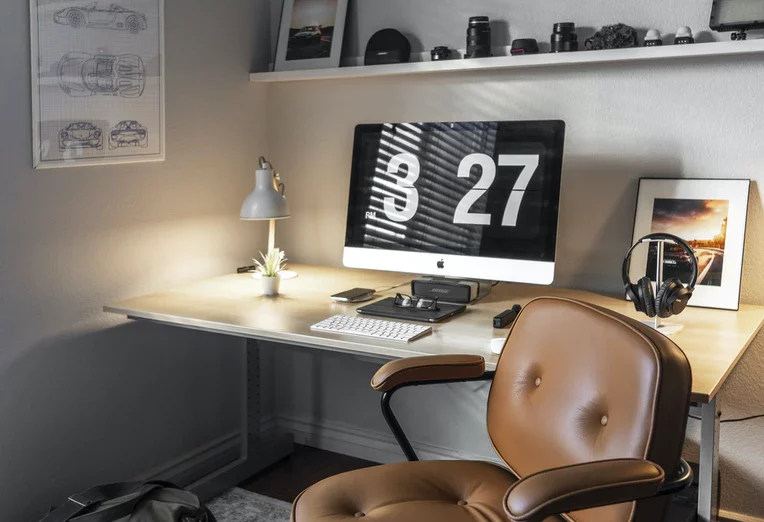
    • 1. Use The Walls To Display Pictures Or Other Items That Are Important To You
    • 2. Install Overhead Shelving
    • 3. Use Legless Furniture Whenever Possible
    • 4. Use Under Bed Storage Units
    • 5. Plan Around Your Computer Workstation

Here Are 5 Tips On How To Create A Great Home Office Space

1. Use The Walls To Display Pictures Or Other Items That Are Important To You

Use floating shelves on one wall to give yourself more display options without adding width. These shelves should be at eye level so you can see what’s there when sitting behind your desk, but they should not take up too much space in your office layout. Also, consider getting bookcases if storage is needed – they are still slender enough to fit into a hallway corner while providing plenty of storage space.

2. Install Overhead Shelving

Having cheap garage shelving or two above your desk is a great way to free up some surface space and still have things close at hand when needed most – such as reference materials, manuals, and other items that you often use. 

While partitions do not allow for much headroom, an area of shelving can be built into the layout with no problem. In addition, a wall-mounted track can be used so you can easily slide even tall storage units out of the way if necessary without needing to move a bunch of stuff.

3. Use Legless Furniture Whenever Possible

A table or desk with legs can take up a lot of floor space – even more than you might think if the legs are large and bulky. So instead, consider an office cabinet that has no legs of its own but rather sits directly on the floor. Not only will this free up tons of space, but it also makes it easier for you to get in and out of your chair without having to climb over anything! 

Another option is using furniture with wheels so you can easily move things around when needed instead of finding extra storage space elsewhere in the room where it cannot be reached easily at all times.

4. Use Under Bed Storage Units

Whenever possible, use under bed storage units to store your office supplies instead of putting them on shelves or in drawers where you have to move things aside every time you need something out. 

Since these units come in all kinds of sizes and styles, it is quite easy to find one that will fit your needs without making the room look cluttered with too much furniture. If they are not tall enough for what you need, just build some extra shelving above them!

5. Plan Around Your Computer Workstation

Whenever possible, plan around your computer workstation and other items that you often use, such as a printer or fax machine. If these items can be placed near each other, this leaves plenty of room for extra storage space to hold all of the extras that do not need to be accessed quite often. 

In addition, putting your files within reach is just asking for trouble since it encourages constant interruptions from coworkers/family members who have questions about the filing system.


TAGGED:header
Share This Article
Facebook Copy Link

You Might Also Like ↷

Reality TV

April 22, 2021

Customer Data

May 27, 2020

Garden Centres

December 13, 2022

LED PRINTERS

October 4, 2018
  • RSS
  • Terms And Conditions
  • Privacy Policy
  • Contact
  • Licensing
  • Contacts
  • Cookie Policy

Start Your Business Magazine: The Ultimate Business Start Up Guide provides information advice and guidance for entrepreneurs and new business start ups. Get the latest from us delivered directly to your inbox.

Start Your Business Magazine
  • Store
  • Features
  • Book
  • Trending
  • Topics
FacebookLike
XFollow
InstagramFollow
YoutubeSubscribe

Copyright 2026 Gambit Interactive Media Limited – All Rights Reserved.

Manage Cookie Consent
We use technologies like cookies to store and/or access device information. Cookies are used for ads personalisation We do this to improve browsing experience as well as show personalized ads. Consenting to these technologies will allow us to process data such as browsing behavior or unique IDs on this site. Not consenting or withdrawing consent, may adversely affect certain features and functions.
Functional Always active
The technical storage or access is strictly necessary for the legitimate purpose of enabling the use of a specific service explicitly requested by the subscriber or user, or for the sole purpose of carrying out the transmission of a communication over an electronic communications network.
Preferences
The technical storage or access is necessary for the legitimate purpose of storing preferences that are not requested by the subscriber or user.
Statistics
The technical storage or access that is used exclusively for statistical purposes. The technical storage or access that is used exclusively for anonymous statistical purposes. Without a subpoena, voluntary compliance on the part of your Internet Service Provider, or additional records from a third party, information stored or retrieved for this purpose alone cannot usually be used to identify you.
Marketing
The technical storage or access is required to create user profiles to send advertising, or to track the user on a website or across several websites for similar marketing purposes.
  • Manage options
  • Manage services
  • Manage {vendor_count} vendors
  • Read more about these purposes
View preferences
  • {title}
  • {title}
  • {title}
Go to mobile version